01
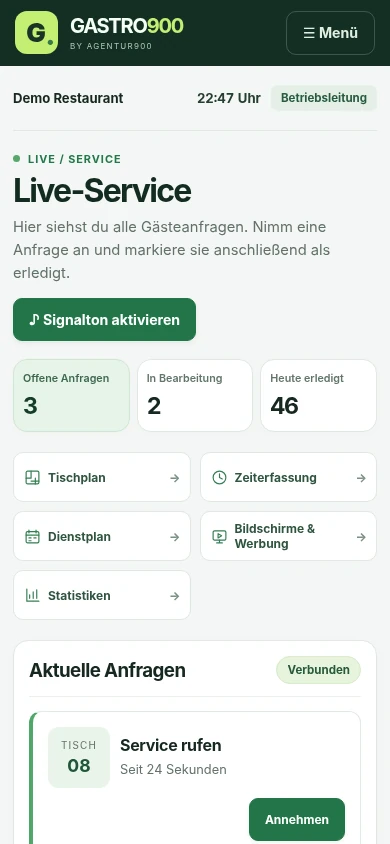
“Who's looking after table 8?”
Service requests get lost in the rush.
Digital waiter call
One clear request. One responsible team.
Guests scan the table QR code and staff see open and completed requests.
Waiting guests, missed service requests, messy shift schedules and endless tasks. GASTRO900 brings service, digital signage, staff scheduling and operations together in one system. So you can spend more time with your guests.
You don't need another program that takes up your time. You need a workflow that works.
Service requests get lost in the rush.
Guests scan the table QR code and staff see open and completed requests.
Every screen needs separate updates.
Manage advertising centrally and publish scheduled content on connected displays.
Timesheets and shift changes take time.
Connect clocking in, shift planning and corrections with documented review.
Routine tasks get forgotten during busy shifts.
Document checklists, deadlines and operational hygiene checks digitally.
Scroll through the features or jump to your topic. All software screens use neutral sample data. The current application is shown in German, with mobile views on smartphones.

Digital waiter calls send requests straight to the team. Everyone can see what is still open.
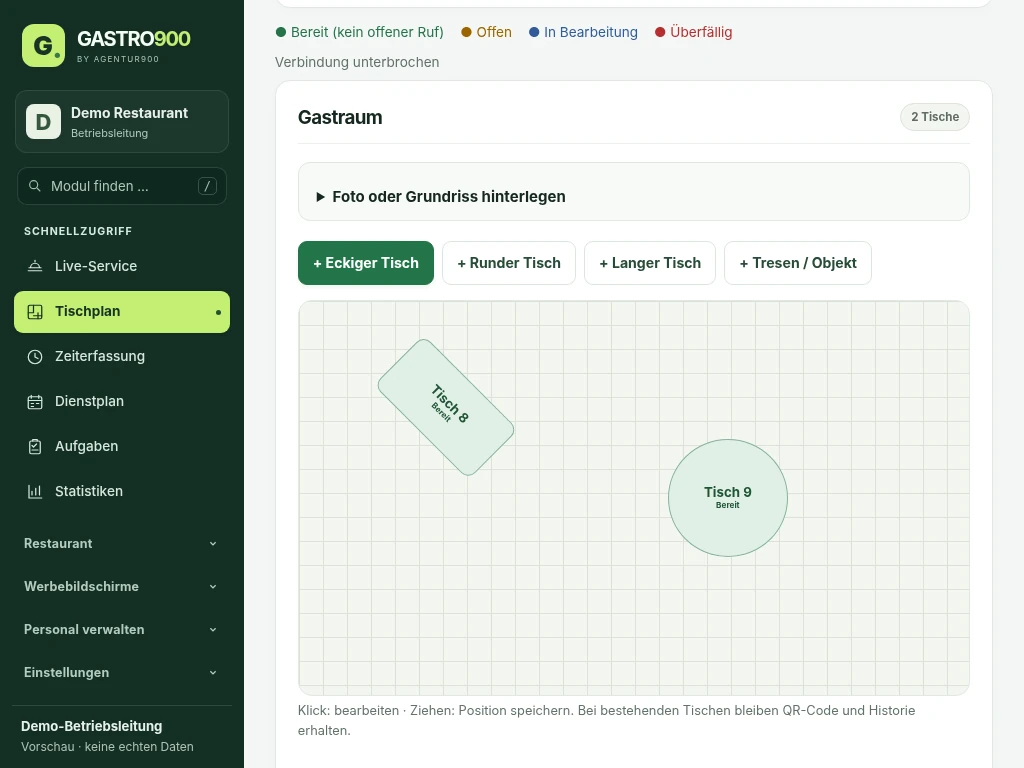
Create your own floor plan and adapt it to events or changing seating arrangements.

From daily specials to synchronized video walls: manage your content centrally.

Understand service requests, response times and request types. Identify where workflows can improve.

The right tool in the right place. Your team works in the browser while your ads run on connected displays.
Guest requests go straight to your team.
Arrange, rotate and resize tables.
Your offers. Your schedule.
From shift planning to closing time. Less paperwork, clearer responsibilities and traceable working hours.
Explore staff tools ↗Start with features that help your daily operations. Add more modules later.
For an organized dining room.
For digital advertising in your venue.
For your team behind the scenes.
We'll tailor your package to your business. Scope and price are agreed in the conversation.
Good software has to prove itself in everyday use. This is a space for the people who work with it.
Approved testimonials will follow.
Bring your questions and workflows. In 15 minutes, we'll show you how GASTRO900 fits.
Get to know it live ↗New software must fit your business, not the other way around.
Ask us directly ↗Employees have their own accounts and see functions intended for their roles. Frequently used work areas are easy to reach. Try the workflows yourself in a demo.
No. Guests scan the table QR code and open the service in their smartphone browser. You decide which requests are available.
No. GASTRO900 complements your existing POS and website. It is not a POS system and automatic integration with arbitrary POS systems is not part of the current product.
Signage requires a suitable device with a compatible browser and internet connection. Existing displays can often be used with a suitable player. A time clock can run on a suitable tablet. We check compatibility before deployment.
No. Start with the areas you need and extend your licence later. Prices and scope depend on your package and business.
The current browser-based software requires a server connection for normal operation. Continuous offline use is not promised.
No. GastroHygiene documents operational checks based on your plans and limits. Professional and legal responsibility remains with the business.
We'll show you GASTRO900 live and explore which features fit your business.
Free and without obligation. No purchase or commitment.
Your personal GASTRO900 product demo is confirmed and reserved for you.
Before your appointment, you will receive the meeting link separately by email.
We will show you the features that suit your business and answer your questions.
See you soon! Your AGENTUR900 team